Showing posts with label esx. Show all posts

Wednesday, August 11, 2010

VMware Management Assistant Panics on Magny Cours

VMware's current version of its vSphere Management Assistant - also known as vMA (pronounced "vee mah") - will crash when run on an ESX host using AMD Magny Cours processors. This behavior was discovered recently when installing the vMA on an AMD Opteron 6100 system (aka. Magny Cours) causing a "kernel panic" on boot after deploying the OVF template. Something of note is the crash also results in 100% vCPU utilization until the VM is either powered-off or reset:

[caption id="attachment_1624" align="aligncenter" width="436" caption="vMA Kernel Panic on Import"]vMA Kernel Panic on Import[/caption]

As it turns out, no manner of tweaks to the virtual machine's virtualization settings nor OS boot/grub settings (i.e. noapic, etc.) seem to cure the ills for vMA. However, we did discover that the OVF deployed appliance was configured as a VMware Virtual Machine Hardware Version 4 machine:

[caption id="attachment_1625" align="aligncenter" width="450" caption="vMA 4.1 defaults to Virtual Machine Hardware Version 4"]vMA 4.1 defaults to Hardware Version 4[/caption]

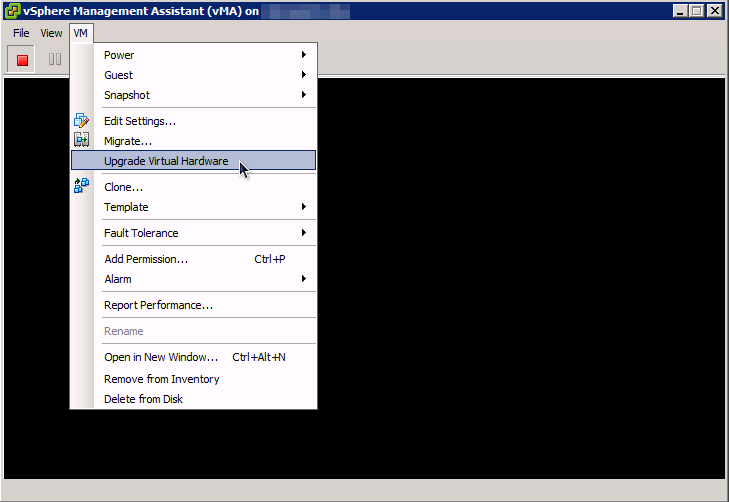
Since our lab vMA deployments have all been upgraded to Virtual Machine Harware Version 7 for some time (and for functional benefits as well), we tried to update the vMA to Version 7 and try again:

[caption id="attachment_1626" align="aligncenter" width="450" caption="Upgrade vMA Virtual Machine Version..."]Upgrade vMA Virtual Machine Version...[/caption]

This time, with Virtual Hardware Version 7 (and no other changes to the VM), the vMA boots as it should:

[caption id="attachment_1627" align="aligncenter" width="450" caption="vMA Booting after Upgrade to Virtual Hardware Version 7"]vMA Booting after Upgrade to Virtual Hardware Version 7[/caption]

Since the Magny Cours CPU is essentially a pair of tweaked 6-core Opteron CPUs in a single package, we took the vMA into the lab and deployed it to an ESX server running on AMD 2435 6-core CPUs: the vMA booted as expected, even with Virtual Hardware Version 4. A quick check of the community and support boards show a few issues with older RedHat/Centos kernels (like vMA's) but no reports of kernel panic with Magny Cours. Perhaps there are just not that many AMD Opteron 6100 deployments out there with vMA yet...

Sunday, July 18, 2010

Quick-Take: NexentaStor AD Shares in 100% Virtual SMB

Here's a maintenance note for SMB environments attempting 100% virtualization and relying on SAN-based file shares to simplify backup and storage management: beware the chicken-and-egg scenario on restart before going home to capture much needed Zzz's. If your domain controller is virtualized and it's VMDK file lives on SAN/NAS, you'll need to restart SMB services on the NexentaStor appliance before leaving the building.

Here's the scenario:

  1. An afterhours SAN upgrade in non-HA environment (maybe Auto-CDP for BC/DR, but no active fail-over);

  2. Shutdown of SAN requires shutdown of all dependent VM's, including domain controllers (AD);

  3. End-user and/or maintenance plans are dependent on CIFS shares from SAN;

  4. Authentication of CIFS shares on NexentaStor is AD-based;


Here's the typical maintenance plan (detail omitted):

  1. Ordered shutdown of non-critical VM's (including UpdateManager, vMA, etc.);

  2. Ordered shutdown of application VM's;

  3. Ordered shutdown of resource VM's;

  4. Ordered shutdown of AD server VM's (minus one, see step 7);

  5. Migrate/vMotion remaining AD server and vCenter to a single ESX host;

  6. Ordered shutdown of ESX hosts (minus one, see step 8);

  7. vSphere Client: Log-out of vCenter;

  8. vSphere Client: Log-in to remaining ESX host;

  9. Ordered shutdown of vCenter;

  10. Ordered shutdown of remaining AD server;

  11. Ordered shutdown of remaining ESX host;

  12. Update SAN;

  13. Reboot SAN to update checkpoint;

  14. Test SAN update - restoring previous checkpoint if necessary;

  15. Power-on ESX host containing vCenter and AD server (see step 8);

  16. vSphere Client: Log-in to remaining ESX host;

  17. Power-on AD server (through to VMware Tools OK);

  18. Restart SMB service on NexentaStor;

  19. Power-on vCenter;

  20. vSphere Client: Log-in to vCenter;

  21. vSphere Client: Log-out of ESX host;

  22. Power-on remaining ESX hosts;

  23. Ordered power-on of remaining VM's;


A couple of things to note in an AD environment:

  1. NexnetaStor requires the use of AD-based DNS for AD integration;

  2. AD-based DNS will not be available at SAN re-boot if all DNS servers are virtual and only one SAN is involved;

  3. Lack of DNS resolution on re-boot will cause a failure for DNS name based NTP service synchronization;

  4. NexentaStor SMB service will fail to properly initialize AD credentials;

  5. VMware 4.1 now pushes AD authentication all the way to ESX hosts, enabling better credential management and security but creating a potential AD dependency as well;

  6. Using auto-startup order on the remaining ESX host for AD and vCenter could automate the process (steps 17 & 19), however, I prefer the "manual" approach after a SAN upgrade in case the upgrade failure is detected only after ESX host is restarted (i.e. storage service interaction in NFS/iSCSI after upgrade).


SOLORI's Take: This is a great opportunity to re-think storage resources in the SMB as the linchpin to 100% virtualization.  Since most SMB's will have a tier-2 or backup NAS/SAN (auto-sync or auto-CDP) for off-rack backup, leveraging a shared LUN/volume from that SAN/NAS for a backup domain controller is a smart move. Since tier-2 SAN's may not have the IOPs to run ALL mission critical applications during the maintenance interval, the presence of at least one valid AD server will promote a quicker RTO, post-maintenance, than coming up cold. [This even works with DAS on the ESX host]. Solution - add the following and you can ignore step 15:

3a. Migrate always-on AD server to LUN/volume on tier-2 SAN/NAS;


24. Migrate always-on AD server from LUN/volume on tier-2 SAN/NAS back to tier-1;


Since even vSphere Essentials Plus has vMotion now (a much requested and timely addition) collapsing all remaining VM's to a single ESX host is a no brainer. However, migrating the storage is another issue which cannot be resolved without either a shutdown of the VM (off-line storage migration) or Enterprise/Enterprise Plus version of vSphere. That is why the migration of the AD server from tier-2 is reserved for last (step 17) - it will likely need to be shutdown to migrate the storage between SAN/NAS appliances.

Friday, January 15, 2010

Quick-Take: It's Time to Upgrade from ESX to ESXi

That's right, I said upgrade from ESX to ESXi - not ESX 3.x to vSphere, but ESX (any version) to vSphere's ESXi! Ever since VMware PartnerExchange 2009 (April), SOLORI has been advising clients and prospects to focus on ESXi and move away from ESX-based hosts - you know, the one with the "Linux" service console. Personally, I'm glad VMware has strengthened their message about the virtues of ESXi and the direction of their flagship product.
ESXi has a superior architecture and we encourage customers to deploy ESXi as part of any new vSphere deployment. Our future posts will compare ESX 4 and ESXi 4 in detail on topics like hardware compatibility list, performance, and management to demonstrate that ESXi is either on par with or superior than ESX. But for now, here are some key points you should know about ESXi vs. ESX:

  1. The functionality and performance of VMware ESX and ESXi are the same; the difference between the two hypervisors resides in their packaging architecture and operational management. VMware ESXi is the latest hypervisor architecture from VMware. It has an ultra thin footprint with no reliance on a general-purpose OS, setting a new bar for security and reliability (learn more).

  2. In the future, ESXi’s superior architecture will be the exclusive focus of VMware's development efforts.

  3. New and existing customers are highly encouraged to deploy ESXi. Many Fortune 100 companies have already standardized on the ESXi platform.


- VMware Blog, June, 2009


Not unfamiliar with the VI3 version of ESXi, its ease of installation, configuration and management and smaller footprint, I was one of about 10 participants in an "ESXi BoF Breakout Session" with Charu Chaubal of VMware. While discussing vSphere's ESXi with Charu, I never heard the words "ESXi is a superior architecture," but I did get a clear message that ESXi was the way of the future. From that point on, it seemed as though any efforts concentrated on (net new) ESX deployments was going to be "time wasted."

However, it was clear by the whispered tone about ESXi's virtues that the timing was not right for the real message to be spoken aloud. Remember, this was the launch of vSphere and "ESXi" was strongly associated with "ESXi Free" - not a clear marketing message when license sales and adoption curves are on the line. Perhaps that's why the "talking points" at PEX2009 always suggested that ESX was the "flagship" hypervisor and ESXi was "targeted for embedded and OEM" deployments.

In practical terms, migration from ESX 3.x to vSphere/ESXi didn't make a lot of sense for many large or institutional customers at the time due to the lack of third-party driver parity between ESX and ESXi in vSphere. However, for net new installations where thrid-party drivers and service console agents were not a concern, the message about ESXi's superiority was getting lost. Thomas Paine once said "what we obtain too cheap, we esteem too lightly" and I'd attribute the slow uptake on ESXi to the perception that it was somehow inferior to ESX - a misconception owed to it being offered in a "free" version.
Price is what you pay; value is what you get.

- Warren Buffet


By Warren Buffet's standards, ESXi is a tremendous value. For the novice entering bare-metal virtualization for the first time, the relative ease with which ESXi installs to a USB flash drive allows for a trial experience that is both quick and reassuring. I'd argue that ESXi's tiny memory footprint and generous hardware support make it the easiest platform for testing bare-metal virtualization. As I've blogged about, ESXi takes about 14 minutes to install to USB flash - from initial CD-ROM boot to configuration console.

Anyone experienced with ESX will have encountered service and performance affecting IRQ sharing issues with the service console. The hours discovering, tracking and mitigating these kinds of issues after a BIOS update or hardware refresh can never be reclaimed. The fact is these problems simply do not exist for ESXi - something many ESXers will appreciate.

I've attended a great deal of WebEx sessions on VMware products over the last year and I'm still hearing hushed tones and uncertainty about the role of ESXi versus ESX. To be clear, ESXi is being talked about as "enterprise ready," but much of the focus is still on ESX. These overtones were still present in an "vSphere: Install, Configure and Manage" course I recently attended to qualify for VCP410. While our instructors were very knowledgeable and experienced, there seemed to be much less confidence when discussing ESXi versus ESX. In fact, the lab guide clearly states:
If you are new to VMware vSphere and you do not have any special needs for more advanced features, use ESXi.

- Page 599, Module 13, Installing VMware ESX and ESXi


The manual - and VMware's choice of message here - seems to indicate that ESX has "more advanced features" than ESXi. While the "advanced features" VMware is talking about are service console related, it leaves many regarding ESXi as the inferior product in sharp contrast to today's message. If the statement "ESXi’s superior architecture will be the exclusive focus of VMware's development efforts" isn't writing on the wall for the rest of you, here's a list of VMware's new talking points on ESXi:

  • Improved Reliability and Security

  • Fewer Patches

  • Less Disk Space

  • Streamlined Deployment and Configuration

  • Reduced Management Overhead

  • Next Generation Hypervisor

  • Superior Architecture

  • Drastically Reduced Hypervisor Footprint

  • Smaller Code Base, Smaller Attach Surface

  • Certified on over 1,000 Server Systems - including USB keys

  • New, Operating System Independent


In contrast, the ESX platform is being re-imaged. Here are some new talking points about ESX:

  • The Older Architecture

  • Relies on Linux OS for Resource Management

  • 20x Larger on-disk Footprint

  • More Complex to Configure

  • Console OS Administration for Configuration and Diagnostics

  • Prone to Arbitrary Code Execution (Console OS)


For many of us familiar with both ESXi and ESX, nothing here is really new. The only real change is the message: build your eco-system around ESXi...

SOLORI's Take: It's clear to me that VMware took inventory of its customers and chose to lead with ESX when vSphere was released. I suspect this was a practical decision due to the overwhelming numbers of ESX hosts already installed. However, the change in marketing and positioning we're witnessing signals that we're moving toward a time when ESX will be openly considered a dead-end variant.

When will ESX be phased-out? That's up to market forces and VMware, but the cloud loves efficiency and ESXi is certainly more resource efficient and compartmentalized than its brother ESX. Furthermore, VMware has to maintain two development and support chains with ESX and ESXi and Darwin likes ESXi. If I had to bet, I wouldn't put my money on seeing an ESX version of the next major release. In any case, when ESX is gone VMware can stop having to make excuses for the "linux console" and the implications that VMware is somehow "based on Linux."

Tuesday, August 18, 2009

In-the-Lab: Full ESX/vMotion Test Lab in a Box, Part 2

In Part 1 of this series we introduced the basic Lab-in-a-Box platform and outlined how it would be used to provide the three major components of a vMotion lab: (1) shared storage, (2) high speed network and (3) multiple ESX hosts. If you have followed along in your lab, you should now have an operating VMware ESXi 4 system with at least two drives and a properly configured network stack.

In Part 2 of this series we're going to deploy a Virtual Storage Appliance (VSA) based on an open storage platform which uses Sun's Zetabyte File System (ZFS) as its underpinnings. We've been working with Nexenta's NexentaStor SAN operating system for some time now and will use it - with its web-based volume management - instead of deploying OpenSolaris and creating storage manually.

Part 2, Choosing a Virtual Storage Architecture


To get started on the VSA, we want to identify some key features and concepts that caused us to choose NexentaStor over a myriad of other options. These are:

  • NexentaStor is based on open storage concepts and licensing;

  • NexentaStor comes in a "free" developer's version with 4TB 2TB of managed storage;

  • NexentaStor developer's version includes snapshots, replication, CIFS, NFS and performance monitoring facilities;

  • NexentaStor is available in a fully supported, commercially licensed variant with very affordable $/TB licensing costs;

  • NexentaStor has proven extremely reliable and forgiving in the lab and in the field;

  • Nexenta is a VMware Technology Alliance Partner with VMware-specific plug-ins (commercial product) that facilitate the production use of NexentaStor with little administrative input;

  • Sun's ZFS (and hence NexentaStor) was designed for commodity hardware and makes good use of additional RAM for cache as well as SSD's for read and write caching;

  • Sun's ZFS is designed to maximize end-to-end data integrity - a key point when ALL system components live in the storage domain (i.e. virtualized);

  • Sun's ZFS employs several "simple but advanced" architectural concepts that maximize performance capabilities on commodity hardware: increasing IOPs and reducing latency;


While the performance features of NexentaStor/ZFS are well outside the capabilities of an inexpensive "all-in-one-box" lab, the concepts behind them are important enough to touch on briefly. Once understood, the concepts behind ZFS make it a compelling architecture to use with virtualized workloads. Eric Sproul has a short slide deck on ZFS that's worth reviewing.

ZFS and Cache - DRAM, Disks and SSD's


Legacy SAN architectures are typically split into two elements: cache and disks. While not always monolithic, the cache in legacy storage typically are single-purpose pools set aside to hold frequently accessed blocks of storage - allowing this information to be read/written from/to RAM instead of disk. Such caches are generally very expensive to expand (when possible) and may only accomodate one specific cache function (i.e. read or write, not both). Storage vendors employ many strategies to "predict" what information should stay in cache and how to manage it to effectively improve overall storage throughput.

[caption id="attachment_968" align="aligncenter" width="405" caption="New cache model used by ZFS allows main memory and fast SSDs to be used as read cache and write cache, reducing the need for large DRAM cache facilities."]New cache model used by ZFS allows main memory and fast SSDs to be used as read cache and write cache, reducing the need for large DRAM cache facilities.[/caption]